Skip to content
StudioIPTV
Tutorials

How to set up IPTV on your device

Pick your device below and follow the steps. Most customers are watching within five minutes — and if you get stuck, we'll do it with you over WhatsApp.

1

Samsung & LG Smart TV

App: IPTV Smarters Pro

Install straight from your TV's own app store — no sideloading needed.

  1. 1Samsung: open Smart Hub and search for “IPTV Smarters Pro”. LG: press Home, open the LG Content Store and search for the same app.
  2. 2Install the app and open it.
  3. 3Choose “Login with Xtream Codes API”.
  4. 4Enter the username, password and portal URL we sent you after ordering.
  5. 5Press Sign In — your channels and EPG load automatically.
2

Amazon Firestick & Fire TV

App: Downloader + Smarters

Fire devices need the app sideloaded through Downloader. Takes about three minutes.

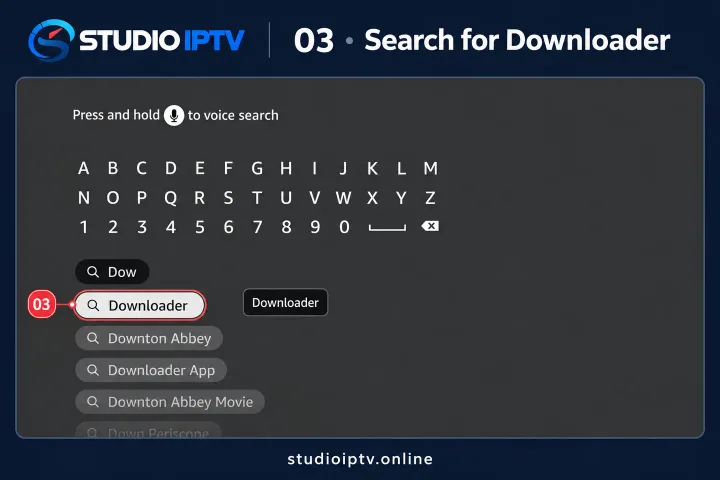
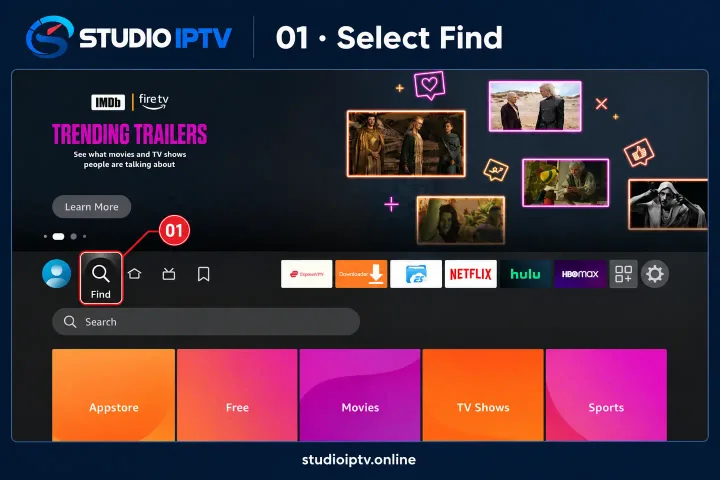
  1. 1From the Fire TV home screen, search for and install the “Downloader” app.
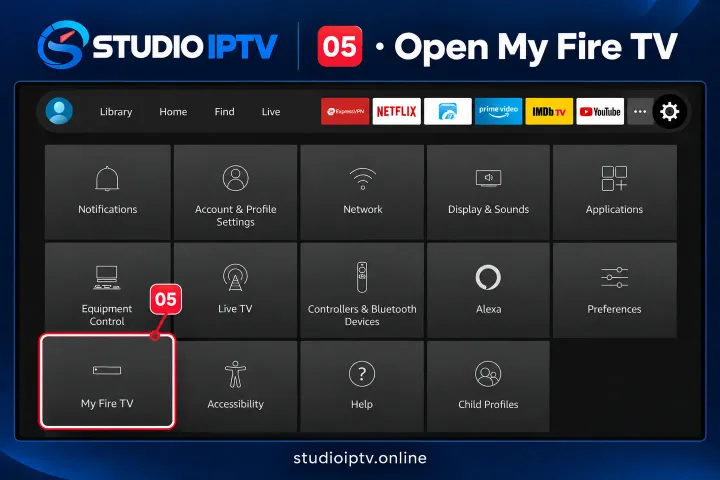
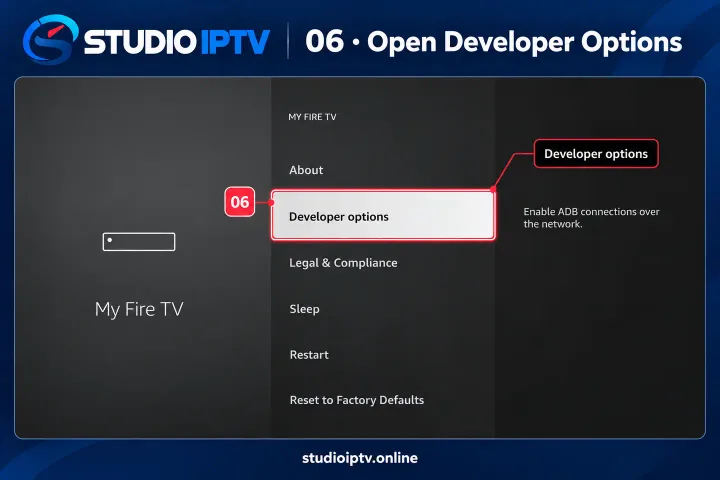
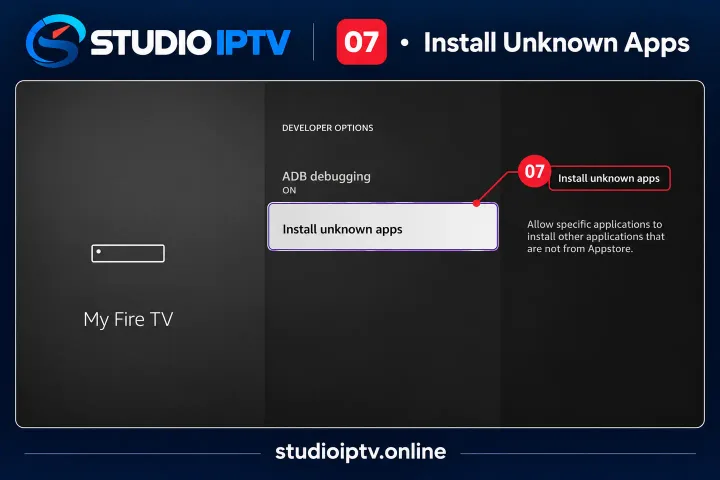
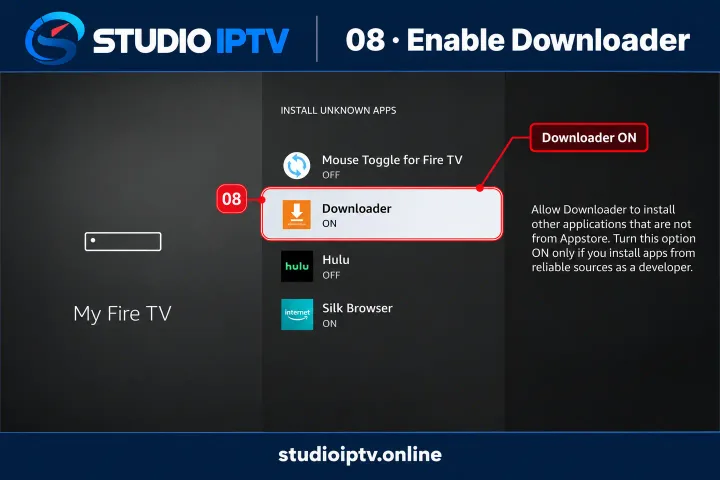
  2. 2Go to Settings → My Fire TV → Developer Options, turn on “Install unknown apps”, then allow Downloader.
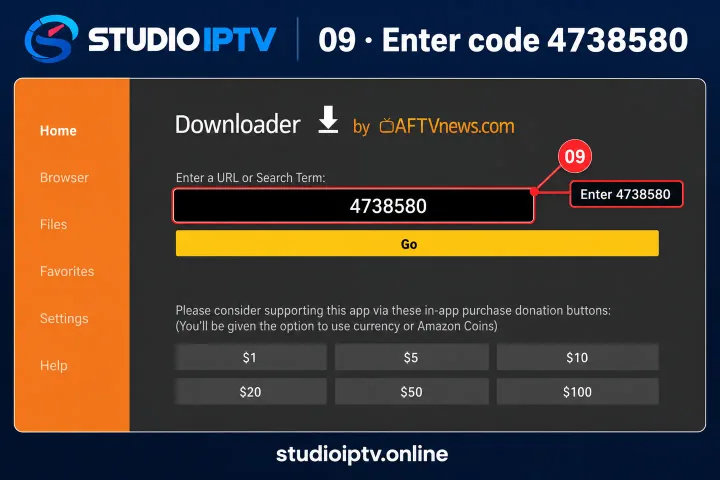
  3. 3Open Downloader and enter the install URL we provide with your subscription.
  4. 4Let the APK download, then choose Install.
  5. 5Delete the APK file when prompted to free up storage, then open the app and sign in.

Step-by-step screenshots

Fire TV home screen with the Find option highlighted
01Select Find on the Fire TV home screen
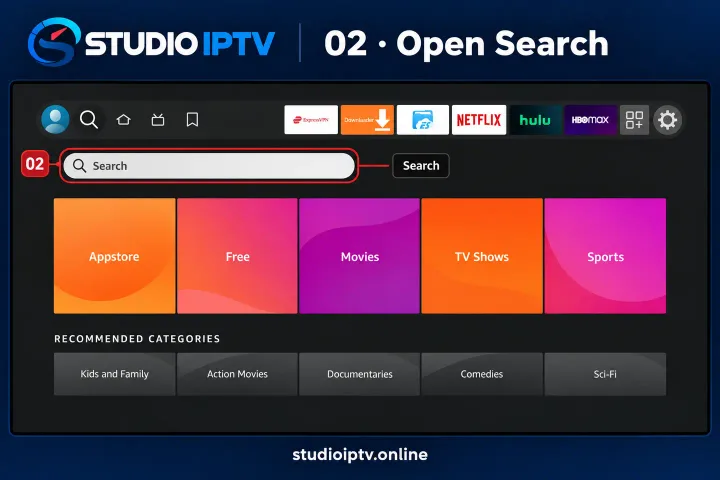
Fire TV search panel open
02Open Search
Searching for the Downloader app on Fire TV
03Search for Downloader and install it
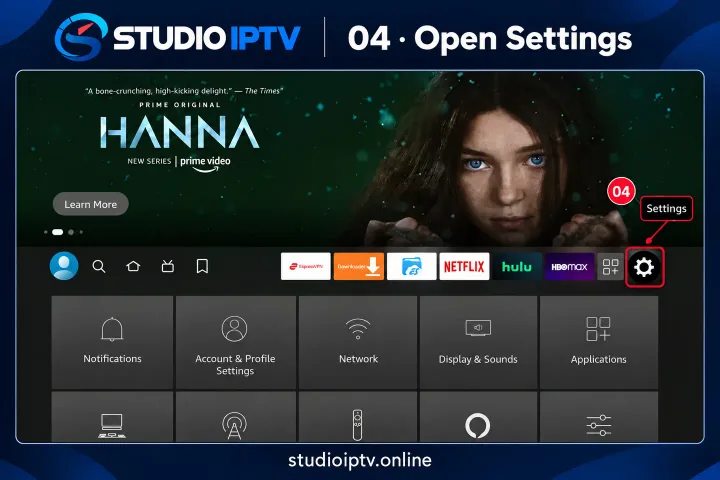
Fire TV settings gear icon highlighted
04Go back to the home screen and open Settings
Fire TV settings menu with My Fire TV highlighted
05Open My Fire TV
My Fire TV menu with Developer options highlighted
06Open Developer options
Developer options with Install unknown apps highlighted
07Select Install unknown apps
Install unknown apps list with Downloader switched on
08Switch Downloader to ON
Downloader app with code 4738580 entered
09Open Downloader, enter code 4738580 and press Go
3

Android TV, Box & Phone

App: XCIPTV Player

Available directly from the Google Play Store.

  1. 1Open the Google Play Store and search for “XCIPTV Player”.
  2. 2Install the app and launch it.
  3. 3Select the Xtream Codes login option.
  4. 4Enter your IPTV username, password and server URL.
  5. 5Tap Sign In to load your channel list.
4

iPhone, iPad & Apple TV

App: Smarters Player Lite

A free App Store download — no jailbreak or sideloading.

  1. 1Open the App Store and install “Smarters Player Lite”.
  2. 2Launch the app and choose “Login with Xtream Codes API”.
  3. 3Enter the login details we sent you.
  4. 4Tap the Live TV icon and pick a channel group.
  5. 5Double-tap any channel to go full screen.
5

MAG Box

App: Built-in portal

Send us your MAC address first so we can register the device.

  1. 1Send us the MAC address printed on the back of your MAG box — we register it on our server.
  2. 2On the box, go to Settings → System Settings → Servers → Portals.
  3. 3Enter a portal name (for example StudioIPTV) and the portal URL we provide.
  4. 4Save the changes.
  5. 5Reboot the box — it loads your channels on startup.
6

Windows PC & Laptop

App: IPTV Smarters

Desktop app for watching on a computer or a connected monitor.

  1. 1Go to iptvsmarters.com and download the Windows version.
  2. 2Run the installer and open the application.
  3. 3Choose “Add New User” and select Xtream Codes API.
  4. 4Enter your username, password and server URL.
  5. 5Click Add User to start watching.
7

IBO Player Pro

App: IBO Player Pro

Used on Smart TVs, Firestick and Android boxes. The app licence is a one-off fee paid to the app developer.

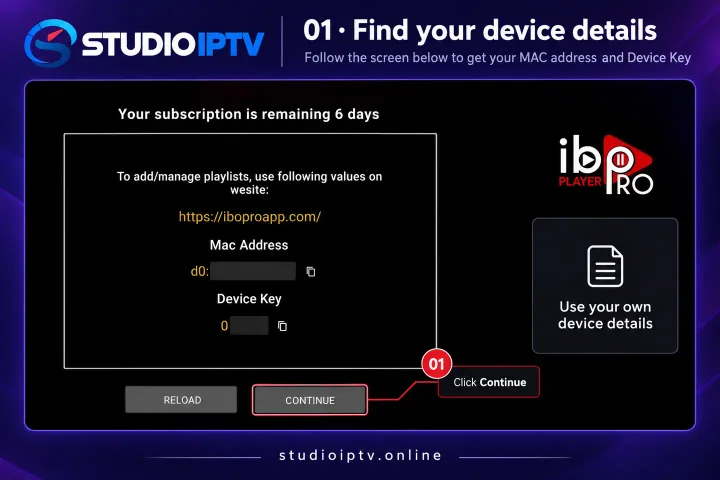
  1. 1Open IBO Player Pro. The first screen shows your MAC address and Device Key — send these to us so we can register the device.
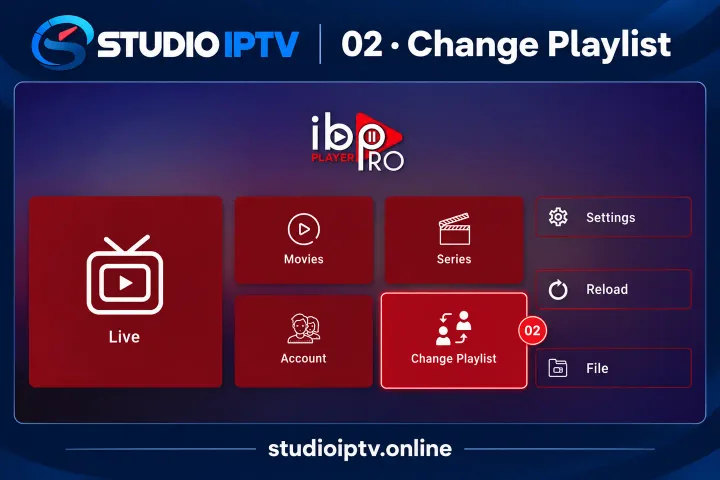
  2. 2From the main menu, choose Change Playlist.
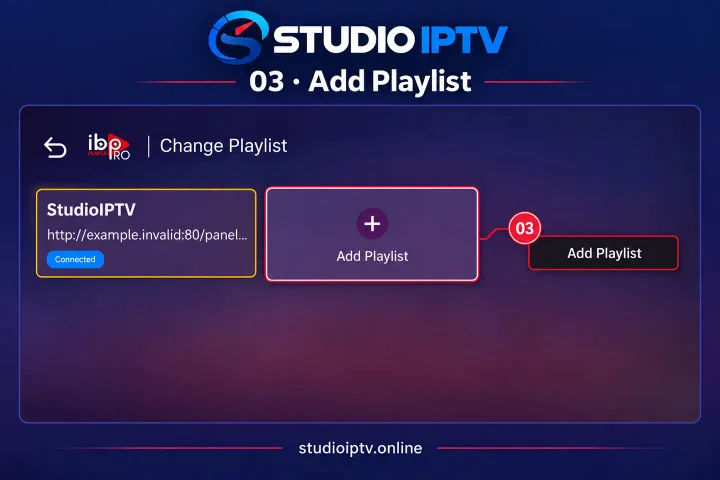
  3. 3Select Add Playlist, then the XTREAM-CODES-API tab.
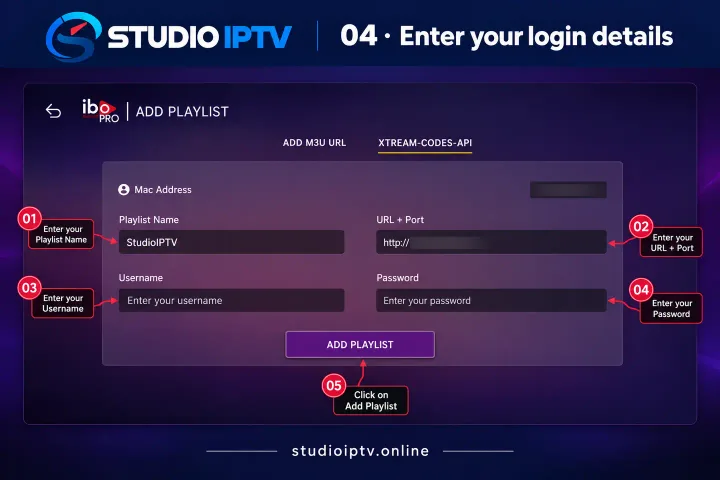
  4. 4Enter a playlist name (for example StudioIPTV) plus the URL, username and password we sent you, then press Add Playlist.
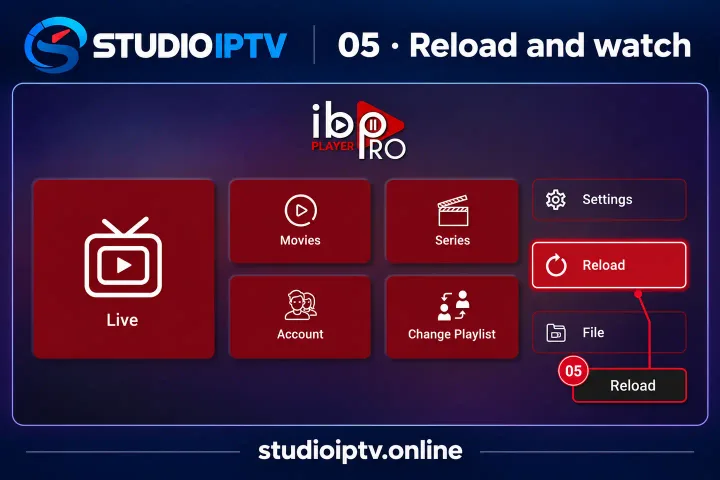
  5. 5Return to the main menu and press Reload. Your channels will load and you can start watching.

Step-by-step screenshots

IBO Player Pro showing the device MAC address and key
01Note your MAC address and Device Key, then press Continue
IBO Player Pro main menu with Change Playlist highlighted
02Open Change Playlist
IBO Player Pro playlist screen with Add Playlist highlighted
03Select Add Playlist
IBO Player Pro Xtream Codes API form
04Enter the playlist name, URL, username and password we sent you
IBO Player Pro main menu with Reload highlighted
05Press Reload, then start watching
8

Enigma2 / Linux (Vu+, DreamBox)

App: SSH command line

Installed over SSH — message us and we will run it with you.

  1. 1Download and open PuTTY (or any SSH client) on your computer.
  2. 2Connect to your receiver's local IP address on port 22.
  3. 3Log in with the receiver's username and password (usually root).
  4. 4Paste the command line containing your M3U link, which we supply after ordering.
  5. 5Press Enter, let it finish, then restart the receiver.

Still stuck? We'll set it up for you

Message us on WhatsApp with your device and we'll walk you through it step by step — 24 hours a day, however long it takes.

Chat with us